> ## Documentation Index
> Fetch the complete documentation index at: https://harnesscalendar.com/docs/llms.txt
> Use this file to discover all available pages before exploring further.
# What's new
> New features and improvements in Harness.
## A more natural way to record and read your money
New add expense and add charge modals, and a transaction detail sheet that explains itself.
 ### Recording an entry
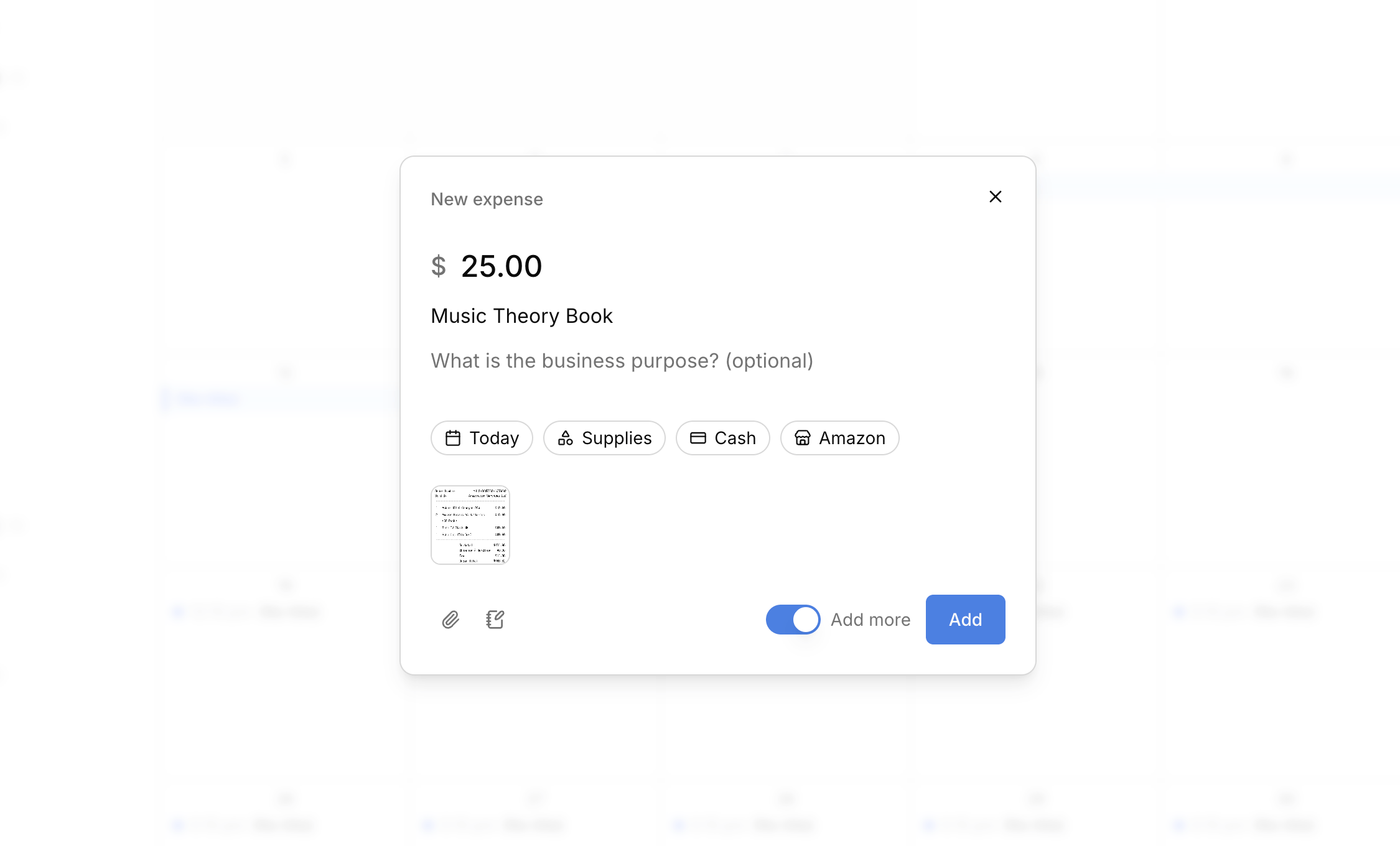
The **Add expense** and **Add charge** modals lead with the money. Type the amount and what it was for. Everything else (date, category, method, vendor, account, who was there) sits below as pills you can move through quickly, already filled with sensible defaults.
* **Receipts.** Drag a file anywhere onto the modal to attach it. Thumbnails appear as you go, and clicking one opens it full size.
* **Add more.** Keep the modal open after saving, so a stack of receipts is one sitting instead of one trip each.
* **Charges show where they land.** A line under the pills tells you which account gets billed, and when.
### Reading an entry
Clicking a transaction opens a sheet shaped around what the entry is, not a single form that half-serves everything.
* **See the state first.** What it is, what it's worth, and where it stands lead the sheet.
* **Follow the money.** A charge, its invoice, and the payment that covered it are one click apart in either direction.
* **Correct in place.** Edit a field where you read it. Changes save as you make them.
* **Detail when you want it.** Receipts, tax fields, processing fees, and reference numbers are there without crowding the facts that matter.
- The filter, tab, and sort you set on a list are remembered, and the back button returns you to the view you were in.
- Enter saves from any modal with a text field. Where Enter belongs to the text itself, like a note or a picker, use Cmd+Enter (Ctrl+Enter on Windows).
- Modals take focus when they open, so screen readers announce them.
- Delete confirmations start on **Cancel**, so Enter can never confirm a deletion by accident.
- Void no longer appears on expenses, where it never meant anything. Delete is how you correct one.
* A pay link opened in two tabs can no longer take two payments for the same invoice, and it refreshes itself if the balance changed after you sent it.
* Your Profit & Loss no longer understates income after a refund.
* The fee Stripe charges for a dispute is recorded on every dispute, including the ones you win. It used to disappear from your books.
* A lost dispute records the money that was seized, so the loss lands somewhere instead of nowhere.
* A payment that lost a dispute can no longer be voided.
* Lesson times are correct for studios more than twelve hours from UTC, where an event could land on the wrong day.
## Harness can now do your billing
Set up how you charge once, and Harness generates the charges, groups them into one invoice per account, and sends them on your schedule.
### Recording an entry
The **Add expense** and **Add charge** modals lead with the money. Type the amount and what it was for. Everything else (date, category, method, vendor, account, who was there) sits below as pills you can move through quickly, already filled with sensible defaults.
* **Receipts.** Drag a file anywhere onto the modal to attach it. Thumbnails appear as you go, and clicking one opens it full size.
* **Add more.** Keep the modal open after saving, so a stack of receipts is one sitting instead of one trip each.
* **Charges show where they land.** A line under the pills tells you which account gets billed, and when.
### Reading an entry
Clicking a transaction opens a sheet shaped around what the entry is, not a single form that half-serves everything.
* **See the state first.** What it is, what it's worth, and where it stands lead the sheet.
* **Follow the money.** A charge, its invoice, and the payment that covered it are one click apart in either direction.
* **Correct in place.** Edit a field where you read it. Changes save as you make them.
* **Detail when you want it.** Receipts, tax fields, processing fees, and reference numbers are there without crowding the facts that matter.
- The filter, tab, and sort you set on a list are remembered, and the back button returns you to the view you were in.
- Enter saves from any modal with a text field. Where Enter belongs to the text itself, like a note or a picker, use Cmd+Enter (Ctrl+Enter on Windows).
- Modals take focus when they open, so screen readers announce them.
- Delete confirmations start on **Cancel**, so Enter can never confirm a deletion by accident.
- Void no longer appears on expenses, where it never meant anything. Delete is how you correct one.
* A pay link opened in two tabs can no longer take two payments for the same invoice, and it refreshes itself if the balance changed after you sent it.
* Your Profit & Loss no longer understates income after a refund.
* The fee Stripe charges for a dispute is recorded on every dispute, including the ones you win. It used to disappear from your books.
* A lost dispute records the money that was seized, so the loss lands somewhere instead of nowhere.
* A payment that lost a dispute can no longer be voided.
* Lesson times are correct for studios more than twelve hours from UTC, where an event could land on the wrong day.
## Harness can now do your billing
Set up how you charge once, and Harness generates the charges, groups them into one invoice per account, and sends them on your schedule.
 ### Set up how you charge
* **Rate presets.** Save your lesson prices once, then pick one when you set a lesson as paid.
* **Recurring charges.** Add standing fees to an account (monthly tuition, instrument rental, a term charge). Save your standard setup as a template and apply it to any account.
* **Billing cycles.** Each account bills daily, weekly, or monthly.
### Charges create themselves
Mark attendance and the charge follows. Recurring charges appear each period on their own, and a one-off charge you add by hand simply rides the account's next bill.
### One invoice per account
At each account's cycle close, Harness gathers every ready charge into one grouped invoice per account. You choose the automation level:
* **Draft for review** (the default): invoices assemble and wait in your Draft list for a glance before sending.
* **Full auto**: invoices assemble and send themselves, with a pay link when Stripe is connected.
* **Manual**: charges accrue and you invoice by hand, like before.
The automated levels are part of the Professional plan.
### See the next bill before it goes out
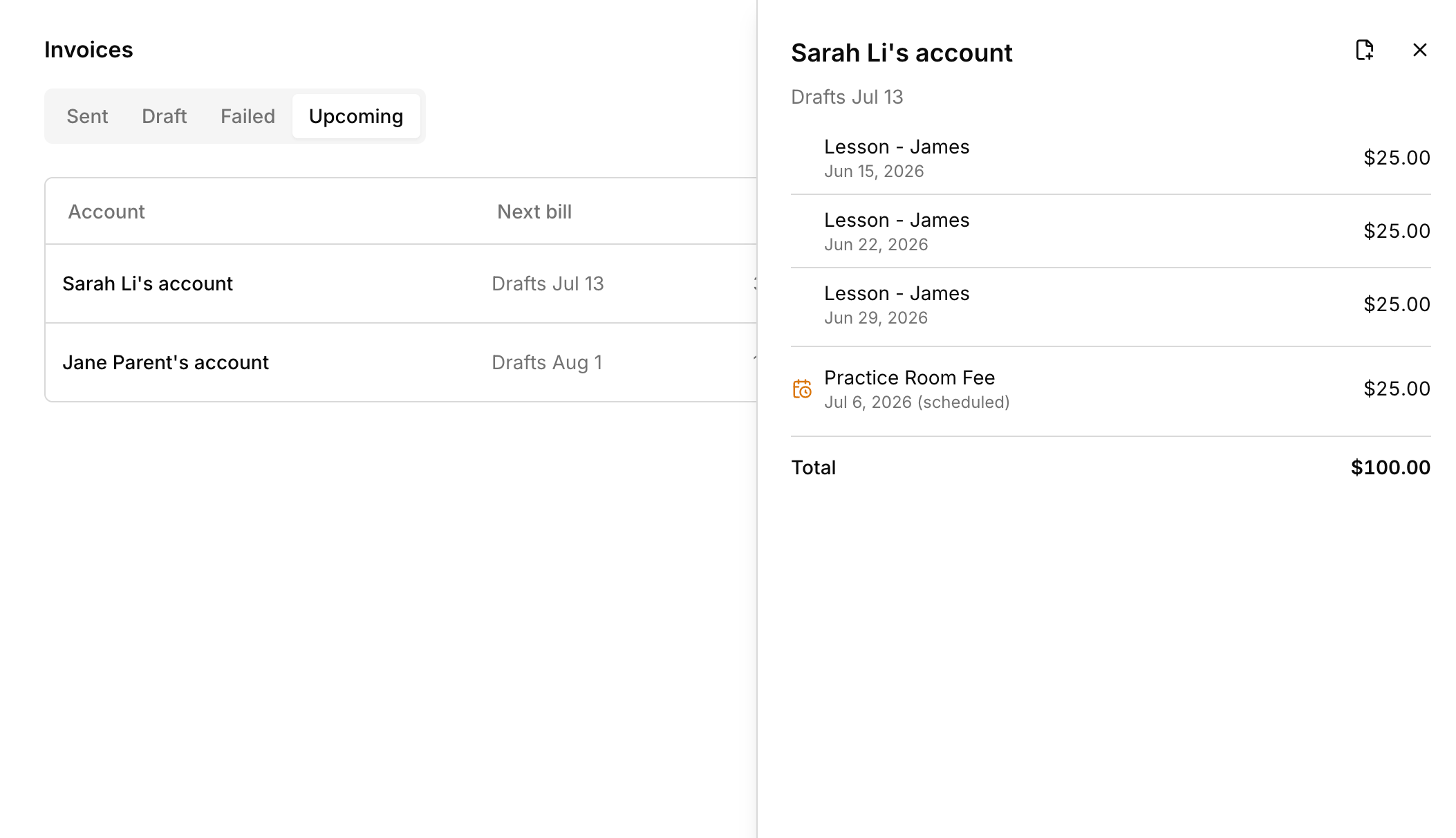
The new **Upcoming** tab shows what each account's next bill will contain and when it goes out, projected recurring charges included.
* Students with no emailable contact and accounts with no billing recipient are flagged in lists and on their pages, next to where you fix them.
* Move a charge to a different account from its transaction details.
* Transaction details show which account a charge belongs to.
* Invoices assembled by Harness carry an **Auto** badge, and drafts with no recipient are flagged.
* New studios choose how often they bill during onboarding.
* A banner warns you if your subscription payment fails, so you can update your card before losing access.
* Recurring lesson times no longer shift when your computer's timezone differs from your studio's, or drift an hour across daylight saving.
## See your calendar the way you work
New calendar views, a faster app, keyboard shortcuts, and a few smaller upgrades.
### Set up how you charge
* **Rate presets.** Save your lesson prices once, then pick one when you set a lesson as paid.
* **Recurring charges.** Add standing fees to an account (monthly tuition, instrument rental, a term charge). Save your standard setup as a template and apply it to any account.
* **Billing cycles.** Each account bills daily, weekly, or monthly.
### Charges create themselves
Mark attendance and the charge follows. Recurring charges appear each period on their own, and a one-off charge you add by hand simply rides the account's next bill.
### One invoice per account
At each account's cycle close, Harness gathers every ready charge into one grouped invoice per account. You choose the automation level:
* **Draft for review** (the default): invoices assemble and wait in your Draft list for a glance before sending.
* **Full auto**: invoices assemble and send themselves, with a pay link when Stripe is connected.
* **Manual**: charges accrue and you invoice by hand, like before.
The automated levels are part of the Professional plan.
### See the next bill before it goes out
The new **Upcoming** tab shows what each account's next bill will contain and when it goes out, projected recurring charges included.
* Students with no emailable contact and accounts with no billing recipient are flagged in lists and on their pages, next to where you fix them.
* Move a charge to a different account from its transaction details.
* Transaction details show which account a charge belongs to.
* Invoices assembled by Harness carry an **Auto** badge, and drafts with no recipient are flagged.
* New studios choose how often they bill during onboarding.
* A banner warns you if your subscription payment fails, so you can update your card before losing access.
* Recurring lesson times no longer shift when your computer's timezone differs from your studio's, or drift an hour across daylight saving.
## See your calendar the way you work
New calendar views, a faster app, keyboard shortcuts, and a few smaller upgrades.
 ### Calendar views
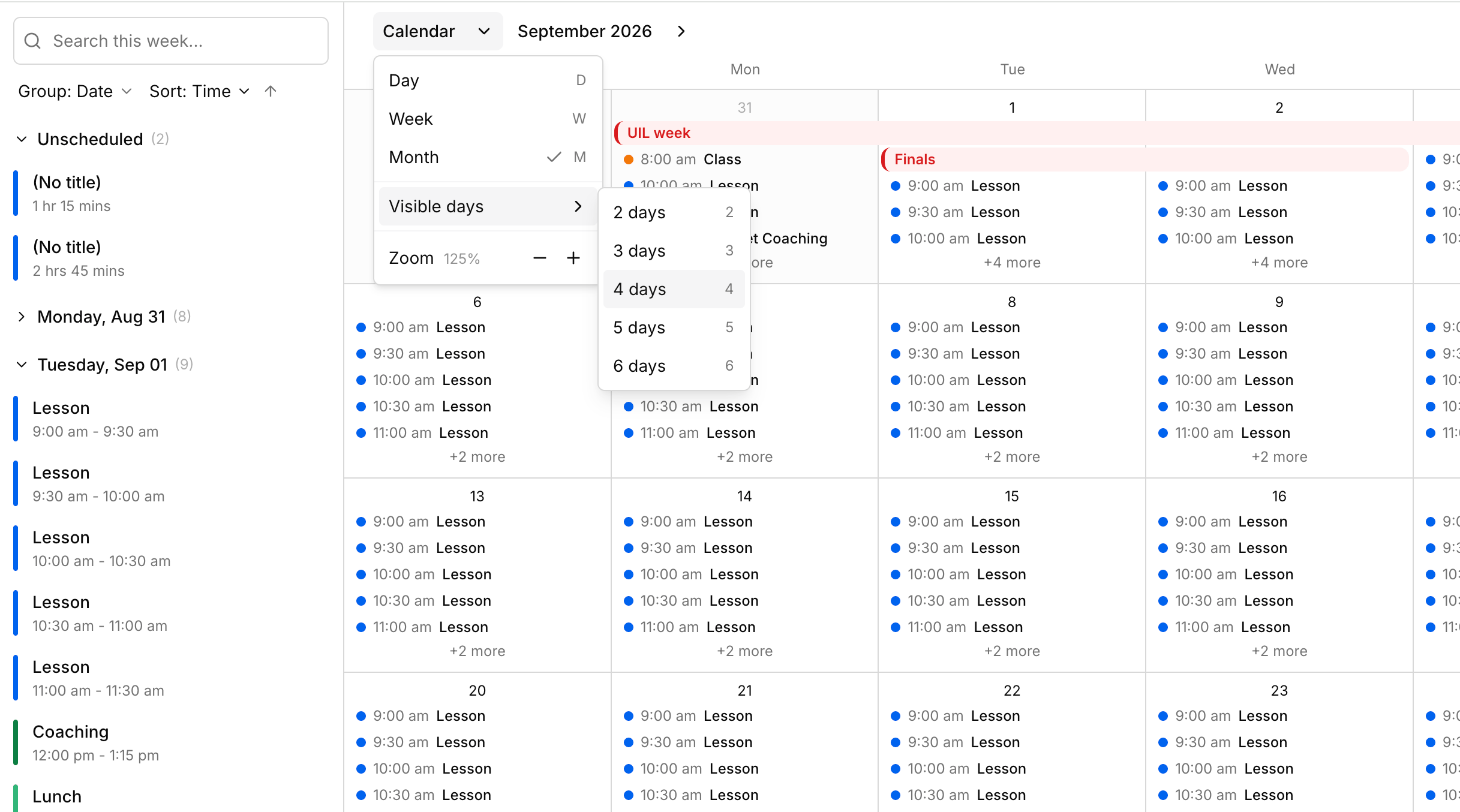
Your calendar can now show more than one fixed week.
* **Month view** for scanning a whole month at a glance, so you can see where you're packed and where there's room.
* **Day view** for focusing on a single busy day.
* **A custom range of 2 to 6 days**, handy if you only teach a few days a week.
* In month view, drag a lesson to another day and it keeps its time, click a date to open that day, or drag across days to block out a multi-day event.
- Pages, transactions, and invoices load faster.
- Right-click any table row to open its actions.
- Keyboard shortcuts for the calendar: press `d`, `w`, or `m` to switch views, `j` and `k` to move forward and back, `t` to jump to today, and `?` to see the full list.
- Send feedback from inside Harness.
- Add your origin address when logging mileage.
* You can send lesson notes without marking attendance first.
* Lesson note emails now show times in your studio's timezone, not UTC.
* Invoices no longer flicker while loading.
## Harness is launched!
Welcome to Harness, the scheduling and financial tracking tool for busy sole proprietors. This is the first release. More is on the way. Check back here to see what's new.
### Calendar views
Your calendar can now show more than one fixed week.
* **Month view** for scanning a whole month at a glance, so you can see where you're packed and where there's room.
* **Day view** for focusing on a single busy day.
* **A custom range of 2 to 6 days**, handy if you only teach a few days a week.
* In month view, drag a lesson to another day and it keeps its time, click a date to open that day, or drag across days to block out a multi-day event.
- Pages, transactions, and invoices load faster.
- Right-click any table row to open its actions.
- Keyboard shortcuts for the calendar: press `d`, `w`, or `m` to switch views, `j` and `k` to move forward and back, `t` to jump to today, and `?` to see the full list.
- Send feedback from inside Harness.
- Add your origin address when logging mileage.
* You can send lesson notes without marking attendance first.
* Lesson note emails now show times in your studio's timezone, not UTC.
* Invoices no longer flicker while loading.
## Harness is launched!
Welcome to Harness, the scheduling and financial tracking tool for busy sole proprietors. This is the first release. More is on the way. Check back here to see what's new.