> ## Documentation Index
> Fetch the complete documentation index at: https://harnesscalendar.com/docs/llms.txt
> Use this file to discover all available pages before exploring further.
# Studio policy
> Your studio policy is the written terms families agree to when they sign up.
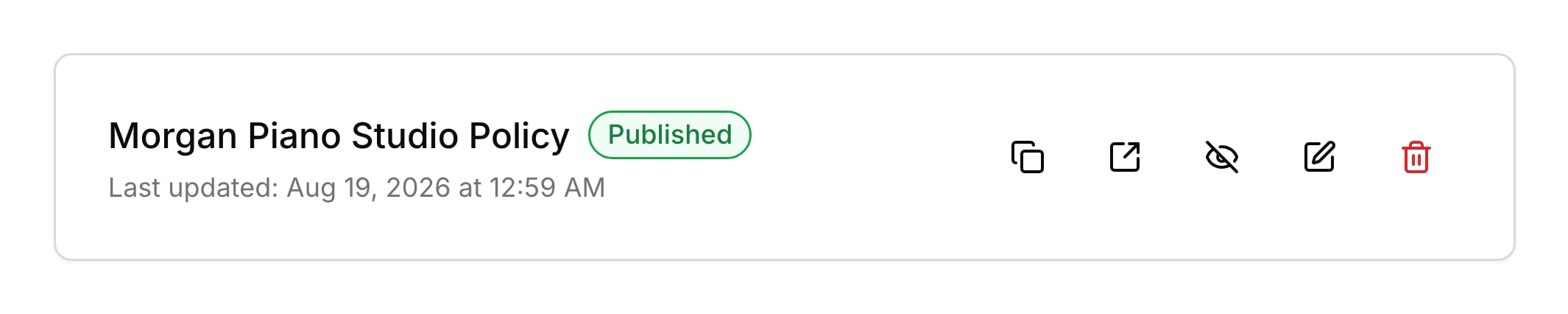
 Your policy lives at one public link that anyone can open. While it's published, your [sign-up form](/docs/sign-up-form) asks new families to agree to it, and their welcome email and the [student portal](/docs/student-portal) link to it.
## Write your policy
Most teachers already have their policy in a document, so you can paste it straight in. Go to **Settings → Policy**, click **Create policy**, paste or type your terms, and click **Create Policy**. Pasted headings and lists keep their formatting. Your policy goes live the moment you create it, so finish it before you save. You can also paste it while you [set up your studio](/docs/set-up-your-studio), or choose **I'll do this later** to skip that step.
## Families agree at sign-up
While your policy is published, families agree to it before they can join. Your [sign-up form](/docs/sign-up-form) ends with a required checkbox: "I have read and agree to the studio policy, including policies on cancellations, payments, and lesson expectations." There's nothing to switch on.
## Update your policy
When you edit your policy, the page at its link changes, so families always read the latest version. Click **Edit policy** on the policy card, make your changes, and click **Save Changes**. If the policy is published, Harness then asks whether to tell families. **Send Notification** emails the [primary contact](/docs/contacts#primary-contact) of each student with an upcoming lesson, and **No Thanks** sends nothing. Each email shows on the family's **Messages** tab, like your other [messages](/docs/messages).
## Unpublish or delete
Unpublishing takes your policy offline but keeps the text, so you can bring it back later. Click **Unpublish policy** and the card shows **Draft**: the link stops working, the checkbox leaves your sign-up form, and the link leaves the portal. Click **Publish policy** to put it back at the same link. **Delete policy** removes it for good. You can write a new one afterward, but it gets a new link, so the link in older emails stops working.
## What your families see
Families read your policy on any device, without signing in. While it's published, they find it in these places:
* On your sign-up form, the words "studio policy" in the checkbox open the policy in a new tab.
* The policy page shows your [studio name](/docs/studio-profile), the date you last changed it, and your policy.
* The [welcome email](/docs/students#what-your-families-see) a family gets when a student joins links to your policy.
* In the student portal, tapping your studio name shows a link to your full policies.
* When you choose to send an update, families get an email from you with a button to read the new policy. It says there's nothing to do, and that continuing lessons means accepting the change.
## FAQ
The update goes only to the primary contact of each student with an upcoming lesson. Pending sign-ups and students with nothing on the calendar don't get it.
Harness asks only after you save changes to a policy that's already published. Creating or publishing a policy sends nothing.
No, only new sign-ups tick the box. The update email tells current families that continuing lessons means accepting the change.
No. Harness requires the checkbox before a family can sign up, but it doesn't keep a record of who ticked it.
The policy was unpublished or deleted. Publishing again brings back the same link, but a new policy after a delete has a new one. Click **Copy link** on the policy card to share it.
This documentation is built and hosted on [Mintlify](https://mintlify.com), a developer documentation platform.
Your policy lives at one public link that anyone can open. While it's published, your [sign-up form](/docs/sign-up-form) asks new families to agree to it, and their welcome email and the [student portal](/docs/student-portal) link to it.
## Write your policy
Most teachers already have their policy in a document, so you can paste it straight in. Go to **Settings → Policy**, click **Create policy**, paste or type your terms, and click **Create Policy**. Pasted headings and lists keep their formatting. Your policy goes live the moment you create it, so finish it before you save. You can also paste it while you [set up your studio](/docs/set-up-your-studio), or choose **I'll do this later** to skip that step.
## Families agree at sign-up
While your policy is published, families agree to it before they can join. Your [sign-up form](/docs/sign-up-form) ends with a required checkbox: "I have read and agree to the studio policy, including policies on cancellations, payments, and lesson expectations." There's nothing to switch on.
## Update your policy
When you edit your policy, the page at its link changes, so families always read the latest version. Click **Edit policy** on the policy card, make your changes, and click **Save Changes**. If the policy is published, Harness then asks whether to tell families. **Send Notification** emails the [primary contact](/docs/contacts#primary-contact) of each student with an upcoming lesson, and **No Thanks** sends nothing. Each email shows on the family's **Messages** tab, like your other [messages](/docs/messages).
## Unpublish or delete
Unpublishing takes your policy offline but keeps the text, so you can bring it back later. Click **Unpublish policy** and the card shows **Draft**: the link stops working, the checkbox leaves your sign-up form, and the link leaves the portal. Click **Publish policy** to put it back at the same link. **Delete policy** removes it for good. You can write a new one afterward, but it gets a new link, so the link in older emails stops working.
## What your families see
Families read your policy on any device, without signing in. While it's published, they find it in these places:
* On your sign-up form, the words "studio policy" in the checkbox open the policy in a new tab.
* The policy page shows your [studio name](/docs/studio-profile), the date you last changed it, and your policy.
* The [welcome email](/docs/students#what-your-families-see) a family gets when a student joins links to your policy.
* In the student portal, tapping your studio name shows a link to your full policies.
* When you choose to send an update, families get an email from you with a button to read the new policy. It says there's nothing to do, and that continuing lessons means accepting the change.
## FAQ
The update goes only to the primary contact of each student with an upcoming lesson. Pending sign-ups and students with nothing on the calendar don't get it.
Harness asks only after you save changes to a policy that's already published. Creating or publishing a policy sends nothing.
No, only new sign-ups tick the box. The update email tells current families that continuing lessons means accepting the change.
No. Harness requires the checkbox before a family can sign up, but it doesn't keep a record of who ticked it.
The policy was unpublished or deleted. Publishing again brings back the same link, but a new policy after a delete has a new one. Click **Copy link** on the policy card to share it.
This documentation is built and hosted on [Mintlify](https://mintlify.com), a developer documentation platform.