> ## Documentation Index
> Fetch the complete documentation index at: https://harnesscalendar.com/docs/llms.txt
> Use this file to discover all available pages before exploring further.
# Inbox and notifications
> The inbox is where Harness tells you what happened while you were away.
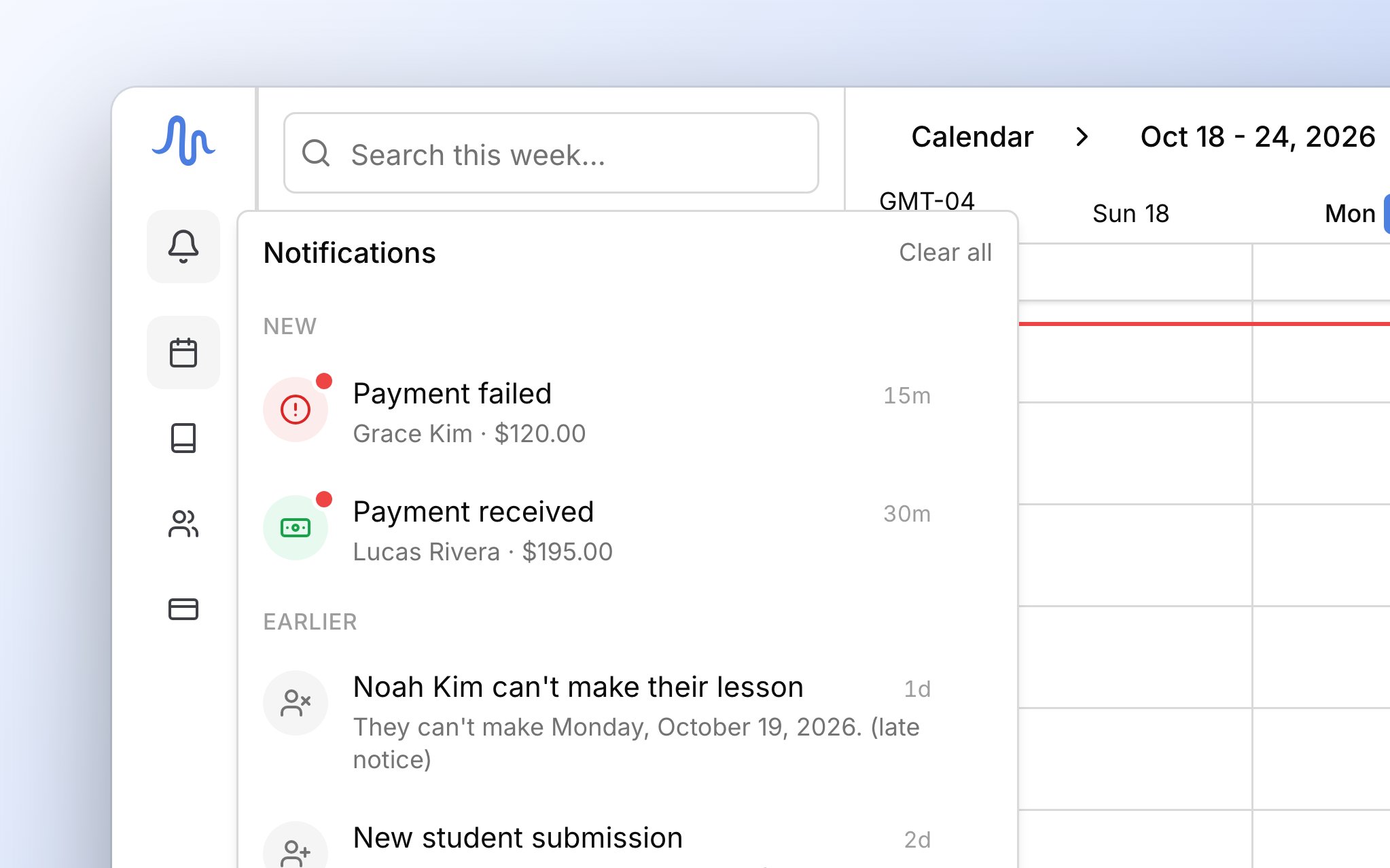
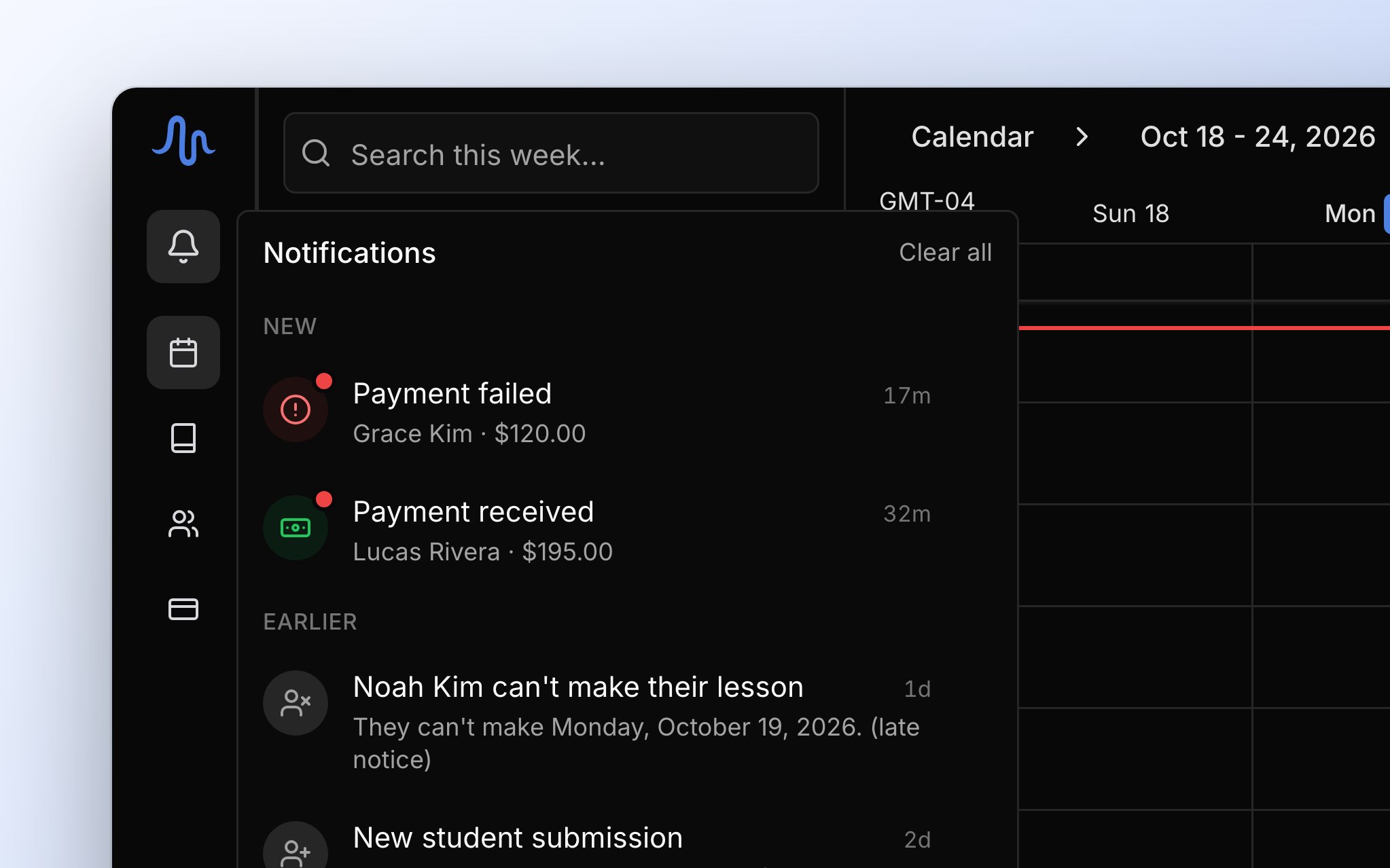 When a family books, pays, or can't make a lesson, or an invoice can't go out, Harness adds a notification to your inbox. Many come by email too. Clicking one opens the invoice, payment, or calendar day it's about.
## What Harness tells you about
Every notification is one of these, and the last column shows which ones also come by email.
| Notification | What it means | Also emailed |
| - | - | - |
| **Billing run complete** | What [automatic billing](/docs/automatic-billing) created and sent that day. | No |
| **Invoice couldn't be sent** | Harness held an automatic invoice as a draft, and the row says why. | No |
| **Invoice not sent**, **Invoice still not sent** | An automatic invoice failed to go out (one you send yourself shows any problem on screen). | No |
| **Recurring charge not billed** | A [recurring charge](/docs/recurring-charges) was skipped, and the row says how to fix it. | No |
| **New student submission** | A family filled in your [sign-up form](/docs/sign-up-form#approve-or-reject-sign-ups). | Yes |
| **Event scheduled** | Someone booked a time through a [scheduling link](/docs/scheduling-links). | Yes |
| **Event rescheduled** | A family moved a time through a [reschedule link](/docs/scheduling-links#reschedule-links). | Yes |
| **\ can't make their lesson** | A family tapped **Can't attend** in the portal. The row adds **(late notice)** when it's inside your [late-cancellation window](/docs/lessons#late-cancellations). | Yes |
| **Payment received** | A family [paid online](/docs/online-payments). | Yes |
| **Bank payment started** | A bank payment began clearing. | Yes |
| **Payment failed** | A bank payment didn't go through. | Yes |
| **Dispute opened** | A family disputed a card payment, and clicking opens Stripe so you can respond. | Yes |
| **Dispute won**, **Dispute lost** | A card dispute ended in your favor or against you, and Harness [records](/docs/online-payments#what-harness-records) the result. | Yes |
| **Bank payment returned** | A family's bank returned a payment, which can't be contested. | Yes |
| **Bank payment return settled** | The returned payment was taken from your Stripe balance. | Yes |
| **\$X refund bounced** | A [card refund](/docs/refunds#card-refunds) came back, and the money is on the account again. | Yes |
| **\$X payment on a closed account**, **\$X payment after closing** | A payment arrived after you closed the account, and the row says whether any is left to [refund](/docs/refunds#refunds-on-a-closed-account). | Yes |
| **Email address stopped working** | Mail to someone [is bouncing](/docs/messages#when-an-address-stops-working), so you can fix the address. | No |
| **Subscription payment failed** | The payment for your own [Harness plan](/docs/your-plan) didn't go through. | No |
Problems with your Stripe account, like a disconnect, come only by email. The inbox is on every plan, so you always hear about sign-ups, **Can't attend**, recurring charges, and bouncing email. Notifications for online payments, scheduling links, and [automatic billing](/docs/automatic-billing) need the [Professional plan](/docs/your-plan).
## The bell and the inbox
The bell is how you know something new has come in. Click **Notifications**, the bell at the top of the sidebar, to open your inbox (on a phone, it opens as a full page). A red dot on the bell means something arrived since you last looked, and opening the inbox clears it. The number beside the bell counts everything in your inbox, not just what's new. On a computer, new items sit under **New** and the rest under **Earlier**, and next time it's one list again. A red icon on a row means something needs you.
## Dismiss and clear
Clicking a row takes you to what it's about but leaves it in your inbox. To remove one, click the **X** on its row, or click **Clear all** at the top of the panel to remove every row. Removing is permanent, but it never changes the invoice, payment, or lesson it was about. The inbox shows your most recent notifications, so older ones move out of view.
## FAQ
Declined cards don't notify you, because the family can try again on the same pay page. Only a failed bank payment does.
It shows only on days Harness created or sent an invoice.
The number counts everything in your inbox. The red dot is what means something new. Dismiss old notifications to bring the number down.
No. Dismissing only removes it from your inbox, and the payment stays on [Transactions](/docs/transactions).
No, there are no notification settings. Dismiss the ones you don't need.
This documentation is built and hosted on [Mintlify](https://mintlify.com), a developer documentation platform.
When a family books, pays, or can't make a lesson, or an invoice can't go out, Harness adds a notification to your inbox. Many come by email too. Clicking one opens the invoice, payment, or calendar day it's about.
## What Harness tells you about
Every notification is one of these, and the last column shows which ones also come by email.
| Notification | What it means | Also emailed |
| - | - | - |
| **Billing run complete** | What [automatic billing](/docs/automatic-billing) created and sent that day. | No |
| **Invoice couldn't be sent** | Harness held an automatic invoice as a draft, and the row says why. | No |
| **Invoice not sent**, **Invoice still not sent** | An automatic invoice failed to go out (one you send yourself shows any problem on screen). | No |
| **Recurring charge not billed** | A [recurring charge](/docs/recurring-charges) was skipped, and the row says how to fix it. | No |
| **New student submission** | A family filled in your [sign-up form](/docs/sign-up-form#approve-or-reject-sign-ups). | Yes |
| **Event scheduled** | Someone booked a time through a [scheduling link](/docs/scheduling-links). | Yes |
| **Event rescheduled** | A family moved a time through a [reschedule link](/docs/scheduling-links#reschedule-links). | Yes |
| **\ can't make their lesson** | A family tapped **Can't attend** in the portal. The row adds **(late notice)** when it's inside your [late-cancellation window](/docs/lessons#late-cancellations). | Yes |
| **Payment received** | A family [paid online](/docs/online-payments). | Yes |
| **Bank payment started** | A bank payment began clearing. | Yes |
| **Payment failed** | A bank payment didn't go through. | Yes |
| **Dispute opened** | A family disputed a card payment, and clicking opens Stripe so you can respond. | Yes |
| **Dispute won**, **Dispute lost** | A card dispute ended in your favor or against you, and Harness [records](/docs/online-payments#what-harness-records) the result. | Yes |
| **Bank payment returned** | A family's bank returned a payment, which can't be contested. | Yes |
| **Bank payment return settled** | The returned payment was taken from your Stripe balance. | Yes |
| **\$X refund bounced** | A [card refund](/docs/refunds#card-refunds) came back, and the money is on the account again. | Yes |
| **\$X payment on a closed account**, **\$X payment after closing** | A payment arrived after you closed the account, and the row says whether any is left to [refund](/docs/refunds#refunds-on-a-closed-account). | Yes |
| **Email address stopped working** | Mail to someone [is bouncing](/docs/messages#when-an-address-stops-working), so you can fix the address. | No |
| **Subscription payment failed** | The payment for your own [Harness plan](/docs/your-plan) didn't go through. | No |
Problems with your Stripe account, like a disconnect, come only by email. The inbox is on every plan, so you always hear about sign-ups, **Can't attend**, recurring charges, and bouncing email. Notifications for online payments, scheduling links, and [automatic billing](/docs/automatic-billing) need the [Professional plan](/docs/your-plan).
## The bell and the inbox
The bell is how you know something new has come in. Click **Notifications**, the bell at the top of the sidebar, to open your inbox (on a phone, it opens as a full page). A red dot on the bell means something arrived since you last looked, and opening the inbox clears it. The number beside the bell counts everything in your inbox, not just what's new. On a computer, new items sit under **New** and the rest under **Earlier**, and next time it's one list again. A red icon on a row means something needs you.
## Dismiss and clear
Clicking a row takes you to what it's about but leaves it in your inbox. To remove one, click the **X** on its row, or click **Clear all** at the top of the panel to remove every row. Removing is permanent, but it never changes the invoice, payment, or lesson it was about. The inbox shows your most recent notifications, so older ones move out of view.
## FAQ
Declined cards don't notify you, because the family can try again on the same pay page. Only a failed bank payment does.
It shows only on days Harness created or sent an invoice.
The number counts everything in your inbox. The red dot is what means something new. Dismiss old notifications to bring the number down.
No. Dismissing only removes it from your inbox, and the payment stays on [Transactions](/docs/transactions).
No, there are no notification settings. Dismiss the ones you don't need.
This documentation is built and hosted on [Mintlify](https://mintlify.com), a developer documentation platform.