> ## Documentation Index
> Fetch the complete documentation index at: https://harnesscalendar.com/docs/llms.txt
> Use this file to discover all available pages before exploring further.
# Accounts
> Accounts are who you bill, usually a family paying for one or more students.
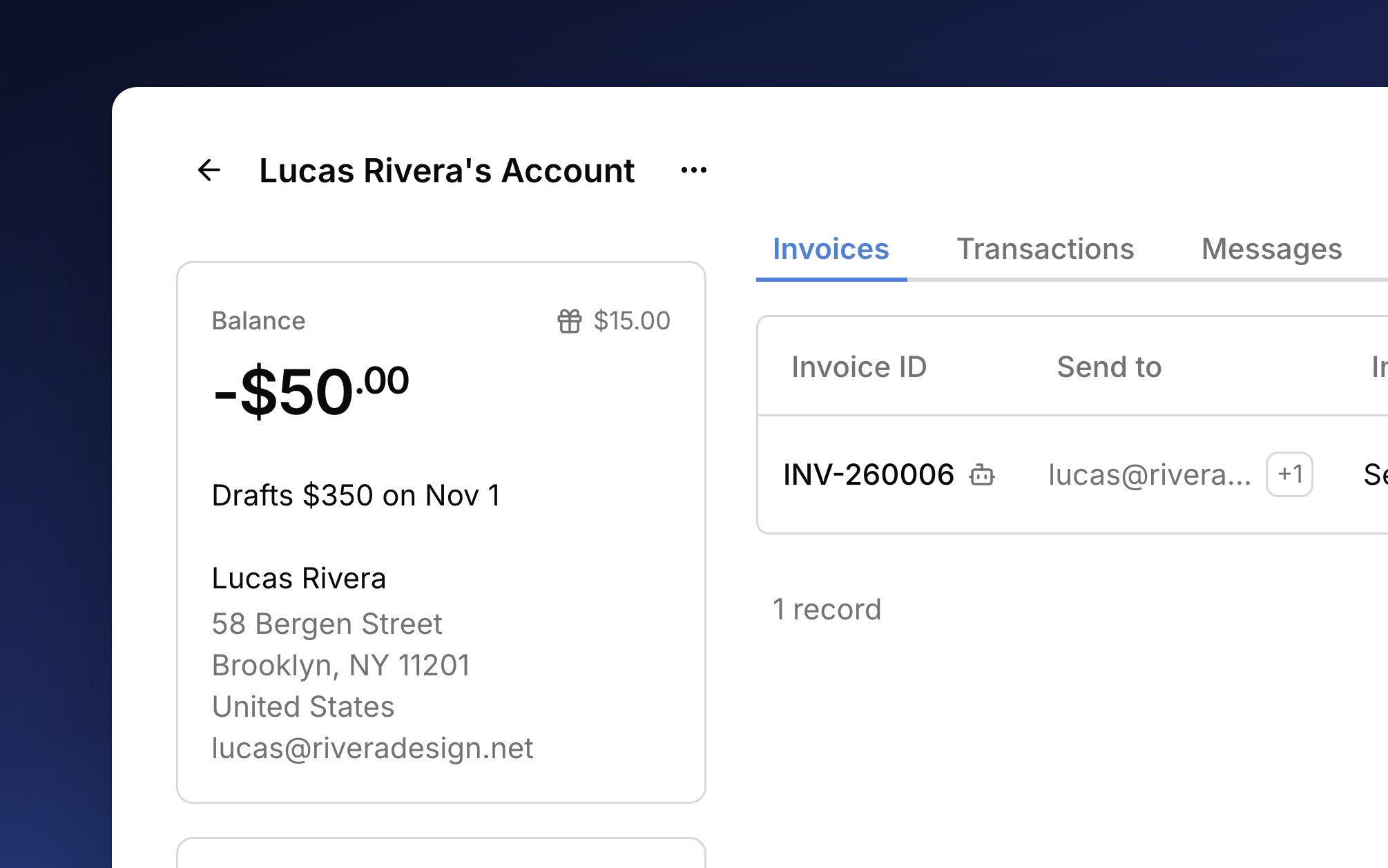
 An account is where billing starts. [Charges](/docs/charges) for its students land on the account, its [invoices](/docs/invoices) collect them, and [payments](/docs/payments) come back to it, so the account always shows what's owed. [Billing rules](/docs/billing-rules) decide which account pays for each student.
## Create an account
Every new student already gets an account billing their [primary contact](/docs/contacts#primary-contact), so you mostly create accounts for a second payer, like a school, a scholarship fund, or a grandparent.
Go to **Finances → Accounts** and click **New account**.
Under **Bill to details**, pick a person, or click **Enter details manually** for an organization (see [Bill-to](#bill-to)).
The **Account name** is optional and shows in the portal. **Billing cycle** sets how often this account is invoiced (see [billing cycles](/docs/automatic-billing#billing-cycles)).
Click **Create account**, and the new account's page opens.
To have the account pay for a student, change who pays on that student's **Billing** tab (see [Billing rules](/docs/billing-rules#change-who-pays)). The account's **Pays for** list then shows them.
## Bill-to
The Bill-to is who the account's invoices are addressed to. Usually it's a person, whose name, address, and email print on every invoice and who can get a portal invite. For a school or other organization, click **Enter details manually** and type its name and email instead.
To send invoices to someone else as well, like a second parent, choose **Add person** from the account's **⋯** menu. They get the account's invoices and can see it in the [student portal](/docs/student-portal). If you change the Bill-to, the old Bill-to person comes off the account. The account's **Messages** tab lists every billing email sent (see [message history](/docs/messages#message-history)).
## Next bill
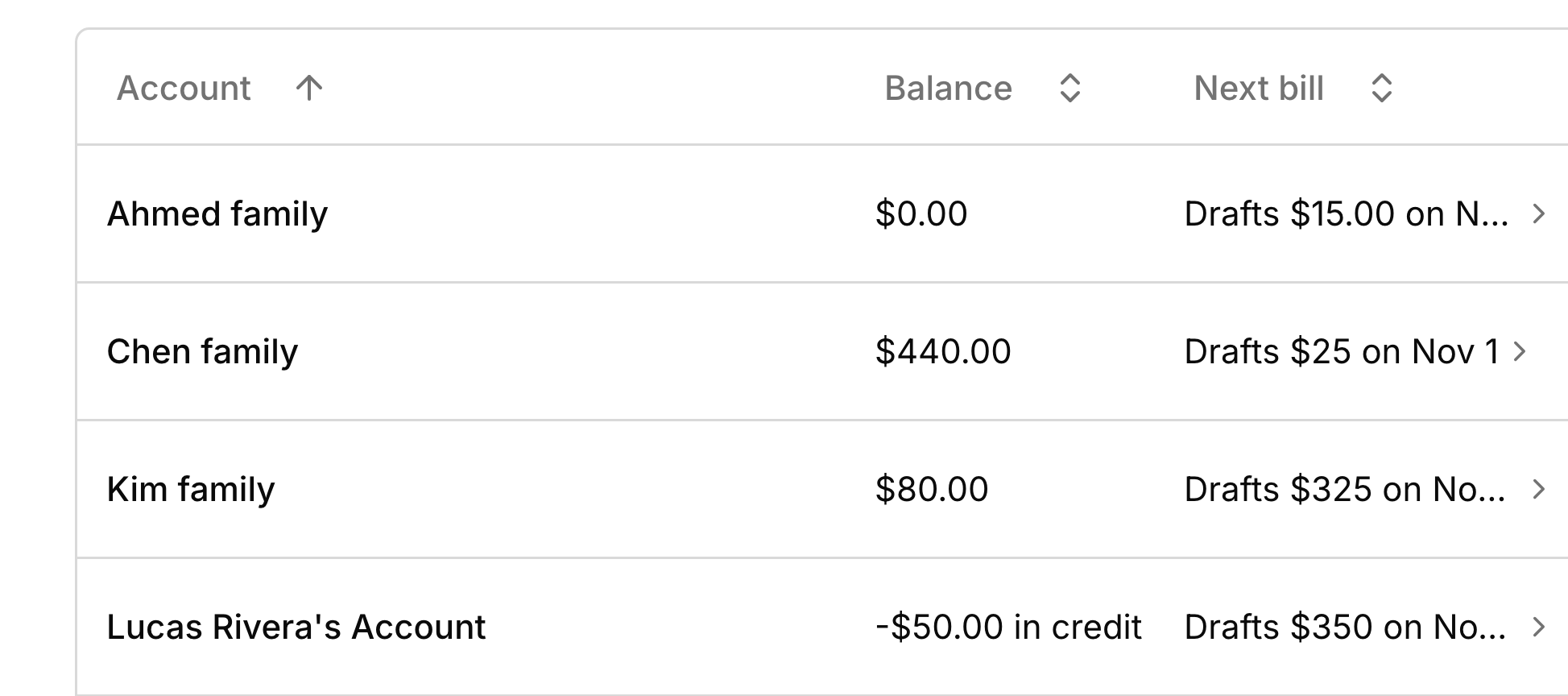
The **Next bill** column on the accounts list shows what each account is about to be billed and when, so you can check a bill before it goes out. Its wording follows your [billing automation](/docs/automatic-billing#how-much-harness-does): "Drafts \$140 on Nov 1" means a draft is coming, and "\$140 to invoice" means you invoice by hand.
Click it to open the bill, which reads like the invoice it will become. Recurring charges that aren't created yet show with a clock and count toward a projected total. To bill early, use **Draft next bill now** or **Send next bill now** at the top. An early bill leaves out recurring charges that aren't due yet, and they wait for the next one.
An account is where billing starts. [Charges](/docs/charges) for its students land on the account, its [invoices](/docs/invoices) collect them, and [payments](/docs/payments) come back to it, so the account always shows what's owed. [Billing rules](/docs/billing-rules) decide which account pays for each student.
## Create an account
Every new student already gets an account billing their [primary contact](/docs/contacts#primary-contact), so you mostly create accounts for a second payer, like a school, a scholarship fund, or a grandparent.
Go to **Finances → Accounts** and click **New account**.
Under **Bill to details**, pick a person, or click **Enter details manually** for an organization (see [Bill-to](#bill-to)).
The **Account name** is optional and shows in the portal. **Billing cycle** sets how often this account is invoiced (see [billing cycles](/docs/automatic-billing#billing-cycles)).
Click **Create account**, and the new account's page opens.
To have the account pay for a student, change who pays on that student's **Billing** tab (see [Billing rules](/docs/billing-rules#change-who-pays)). The account's **Pays for** list then shows them.
## Bill-to
The Bill-to is who the account's invoices are addressed to. Usually it's a person, whose name, address, and email print on every invoice and who can get a portal invite. For a school or other organization, click **Enter details manually** and type its name and email instead.
To send invoices to someone else as well, like a second parent, choose **Add person** from the account's **⋯** menu. They get the account's invoices and can see it in the [student portal](/docs/student-portal). If you change the Bill-to, the old Bill-to person comes off the account. The account's **Messages** tab lists every billing email sent (see [message history](/docs/messages#message-history)).
## Next bill
The **Next bill** column on the accounts list shows what each account is about to be billed and when, so you can check a bill before it goes out. Its wording follows your [billing automation](/docs/automatic-billing#how-much-harness-does): "Drafts \$140 on Nov 1" means a draft is coming, and "\$140 to invoice" means you invoice by hand.
Click it to open the bill, which reads like the invoice it will become. Recurring charges that aren't created yet show with a clock and count toward a projected total. To bill early, use **Draft next bill now** or **Send next bill now** at the top. An early bill leaves out recurring charges that aren't due yet, and they wait for the next one.
 ## Balance and credit
The **Balance** is what the family owes on invoices you've sent. A new charge, like a lesson you just marked, waits on the next bill and doesn't change the balance until it's invoiced. A bank payment lowers the balance once it clears; until then it shows as **Processing** on [Transactions](/docs/transactions#money-on-its-way). To see who owes you most, sort the list by **Balance**.
When a family pays more than they owe, or pays before you've invoiced, the balance goes negative and reads "in credit". That's their own money held on the account. It covers the next invoice you send, or you can [refund it](/docs/refunds#refund-money-on-account) (see [partial payments and overpayments](/docs/payments#partial-payments-and-overpayments)). [Studio credit](/docs/credits) you give is separate, and the gift button beside **Balance** shows it.
## Close, reopen, or delete
When you're done billing a family, close their account. Choose **Close account** from its **⋯** menu. The dialog shows what's owed or left over, and its button names what will happen, like **Write off and close** or **Refund and close** (see [refunds on a closed account](/docs/refunds#refunds-on-a-closed-account)). Closing also ends the account's recurring charges and takes its people off it. The account moves to the **Closed** tab, where it's read-only except for **Issue refund**.
Closing removes every billing rule that names the account, so those students need a new payer before they can be charged again. Reopening doesn't undo the write-off, refunds, or removed rules.
To bring a closed account back, choose **Reopen account** from its **⋯** menu on the **Closed** tab. Add its billing rules and recurring charges again as needed.
An account with no money history can't be closed, only deleted. **Delete account** removes it for good, and the people on it stay in your contacts.
## What your families see
Everyone on the account gets its invoices by email: the Bill-to and anyone you've added. In the [student portal](/docs/student-portal), they see the account's balance and sent invoices under its name. After you close an account, only its Bill-to can still see it, with its past invoices and nothing to pay.
## FAQ
A charge goes to whichever account the student's billing rules named when it was made, and changing a rule only affects new charges. Move an existing one by changing its **Account**, as long as it isn't paid or on a sent invoice (see [Charges](/docs/charges#change-or-void-a-charge)).
The balance counts sent invoices only. The lesson's charge is waiting on the account's [next bill](#next-bill).
It has money history, so it can only be closed. If it has none, a student's billing rules still name it, and Harness lists those students so you can change who pays for them first.
Closing removed the billing rules that named that account, so no one pays for the student. Pick a new [default account](/docs/billing-rules#the-default-account) on their **Billing** tab.
Your billing automation is set to **Manual**, or your studio is on the Hobby plan, so Harness doesn't bill on a date (see [Your plan](/docs/your-plan)). Invoice the account yourself, or open the bill and use **Draft next bill now**.
This documentation is built and hosted on [Mintlify](https://mintlify.com), a developer documentation platform.
## Balance and credit
The **Balance** is what the family owes on invoices you've sent. A new charge, like a lesson you just marked, waits on the next bill and doesn't change the balance until it's invoiced. A bank payment lowers the balance once it clears; until then it shows as **Processing** on [Transactions](/docs/transactions#money-on-its-way). To see who owes you most, sort the list by **Balance**.
When a family pays more than they owe, or pays before you've invoiced, the balance goes negative and reads "in credit". That's their own money held on the account. It covers the next invoice you send, or you can [refund it](/docs/refunds#refund-money-on-account) (see [partial payments and overpayments](/docs/payments#partial-payments-and-overpayments)). [Studio credit](/docs/credits) you give is separate, and the gift button beside **Balance** shows it.
## Close, reopen, or delete
When you're done billing a family, close their account. Choose **Close account** from its **⋯** menu. The dialog shows what's owed or left over, and its button names what will happen, like **Write off and close** or **Refund and close** (see [refunds on a closed account](/docs/refunds#refunds-on-a-closed-account)). Closing also ends the account's recurring charges and takes its people off it. The account moves to the **Closed** tab, where it's read-only except for **Issue refund**.
Closing removes every billing rule that names the account, so those students need a new payer before they can be charged again. Reopening doesn't undo the write-off, refunds, or removed rules.
To bring a closed account back, choose **Reopen account** from its **⋯** menu on the **Closed** tab. Add its billing rules and recurring charges again as needed.
An account with no money history can't be closed, only deleted. **Delete account** removes it for good, and the people on it stay in your contacts.
## What your families see
Everyone on the account gets its invoices by email: the Bill-to and anyone you've added. In the [student portal](/docs/student-portal), they see the account's balance and sent invoices under its name. After you close an account, only its Bill-to can still see it, with its past invoices and nothing to pay.
## FAQ
A charge goes to whichever account the student's billing rules named when it was made, and changing a rule only affects new charges. Move an existing one by changing its **Account**, as long as it isn't paid or on a sent invoice (see [Charges](/docs/charges#change-or-void-a-charge)).
The balance counts sent invoices only. The lesson's charge is waiting on the account's [next bill](#next-bill).
It has money history, so it can only be closed. If it has none, a student's billing rules still name it, and Harness lists those students so you can change who pays for them first.
Closing removed the billing rules that named that account, so no one pays for the student. Pick a new [default account](/docs/billing-rules#the-default-account) on their **Billing** tab.
Your billing automation is set to **Manual**, or your studio is on the Hobby plan, so Harness doesn't bill on a date (see [Your plan](/docs/your-plan)). Invoice the account yourself, or open the bill and use **Draft next bill now**.
This documentation is built and hosted on [Mintlify](https://mintlify.com), a developer documentation platform.